

Welcome to this week’s edition of Mastering Product! If you’ve been following the AI tooling space, you’ve heard the term MCP thrown around a lot. (FYI I am a building a strategy MCP, opensource, launching Monday) But most of the coverage focuses on developers. Today, I’m writing this for product managers. MCP and AI agents aren’t just engineering tools anymore. They’re about to fundamentally change how PMs discover customer problems, validate solutions, and make decisions. This is a practical guide to what MCP is, how PMs can use it today, and what it means for the future of product discovery. No engineering background required.
What MCP Actually Is (In PM Terms)
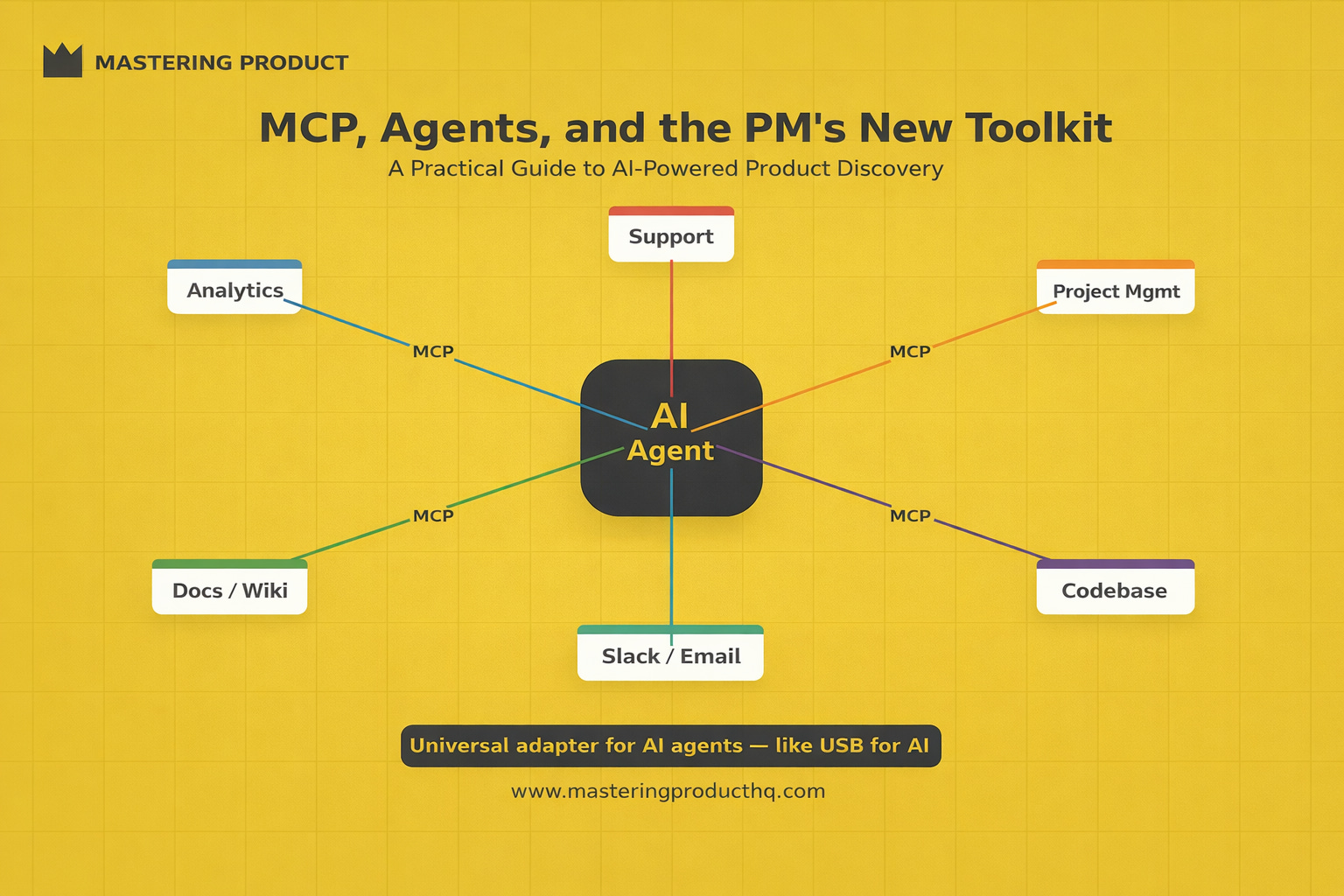
Think of MCP as a universal adapter that lets AI assistants plug into any tool or data source.
Before MCP, if you wanted an AI to access your analytics data, someone had to build a custom integration. Want it to read your Jira board? Another integration. Support tickets? Another one. Each connection was bespoke, brittle, and engineering-dependent.
MCP standardizes this. It’s an open protocol, like USB for AI agents. Once a tool has an MCP server (and hundreds now do), any MCP-compatible AI agent can connect to it. Configure it once, use it everywhere.
For PMs, this means: you can set up an AI assistant that has real-time access to your product data, customer feedback, analytics, project management tool, and codebase all at once. And you can do it yourself, without filing a single engineering ticket.
The PM’s MCP Stack: What to Connect
Here’s the stack I recommend PMs set up, in order of impact:
Tier 1: Connect First (Immediate value)
Customer Feedback Tools (LogRocket, Sentry, Intercom, Zendesk)
Connect your session replay and support tools. This lets you ask your AI agent: “What are the top 5 user frustrations this week?” and get an answer grounded in actual session data and support conversations, not your memory of the last team meeting.
Analytics Platforms (Amplitude, Mixpanel, PostHog)
Connect your product analytics. Ask: “How has onboarding completion changed in the last 30 days?” or “Which user segment has the highest churn risk?” Getting answers in seconds instead of waiting for an analyst cycle changes how quickly you can make decisions.
Project Management (Linear, Jira, Asana)
Connect your task tracker. Your AI agent can now understand your team’s current workload, sprint progress, and backlog, and factor that context into any analysis or recommendation.
Tier 2: Connect Next (Multiplier effect)
Your Codebase (GitHub, GitLab)
Connect your repo. Not to write code, but to understand it. Ask: “Where does the onboarding flow live in the codebase?” or “When was the checkout page last modified and by whom?” This context is invaluable for product decisions.
Communication Tools (Slack, Email)
Connect your team’s communication channels (with appropriate permissions). Your AI agent can surface relevant decisions made in Slack threads, unanswered questions, or recurring team concerns you may have missed.
Documentation (Notion, Confluence)
Connect your knowledge base. This lets the agent reference your existing PRDs, research findings, and strategy docs when helping you make decisions, ensuring consistency with prior thinking.
Tier 3: Advanced (For power users)
Database Access (Read-only)
If your company allows it, read-only database access via MCP lets your AI agent run ad-hoc queries on your behalf. This is the ultimate shortcut for data-driven PMs.
Design Tools (Figma)
Connect Figma to give your agent visibility into current designs, enabling it to reference visual context when discussing features.
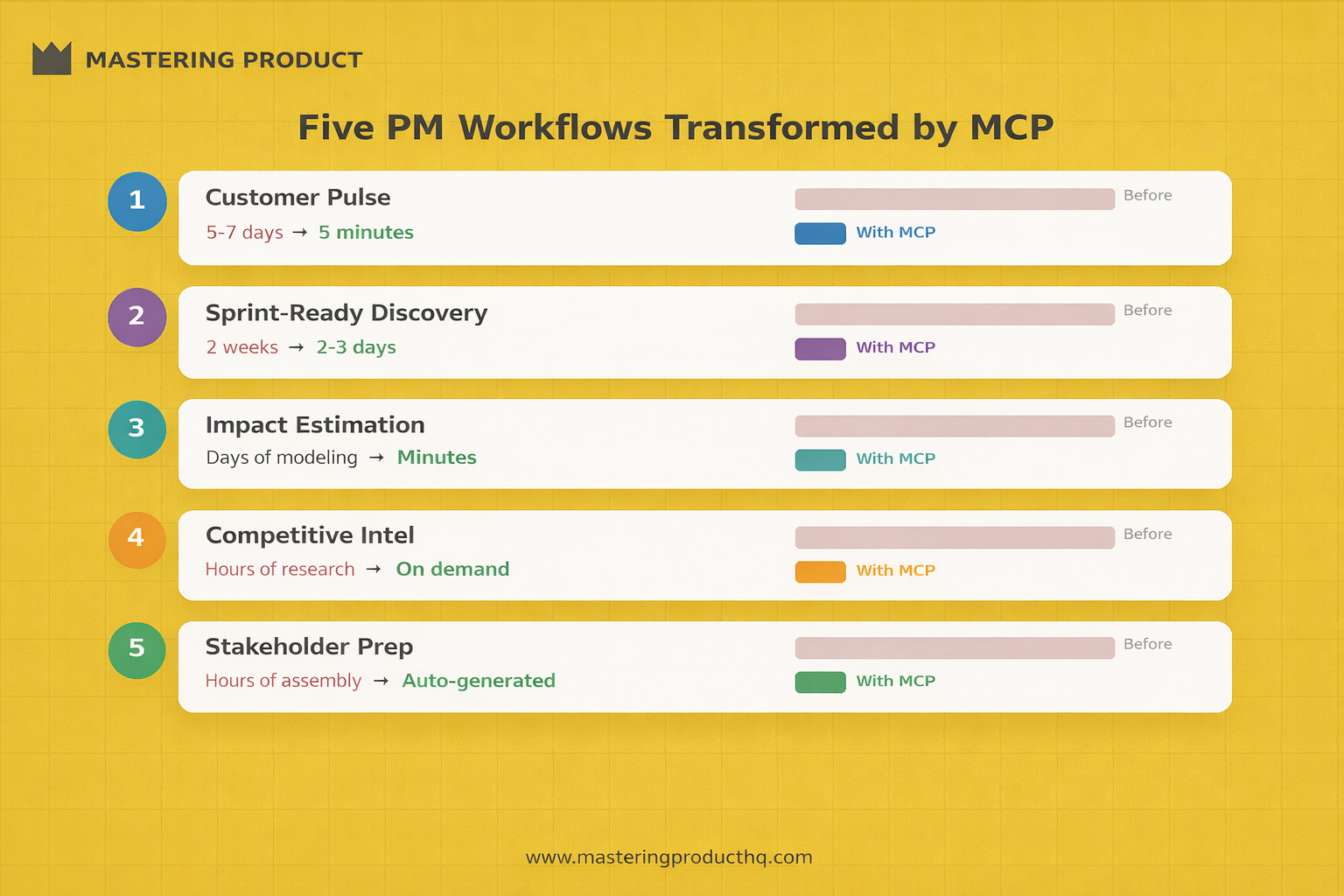
Five PM Workflows Transformed by MCP
Workflow 1: Real-Time Customer Pulse
Before MCP: Wait for the weekly support digest. Read through manually. Compile themes into a doc. Present at the next team meeting. Total cycle: 5-7 days.
With MCP: Ask your agent: *”Scan the last 48 hours of support tickets and LogRocket sessions. What are the top 3 emerging issues by frequency? Include direct quotes and session links for each.”*
Total cycle: 5 minutes. And you can do it daily instead of weekly.
Prompt template:
Review the last [timeframe] of support tickets and session replays.
Identify the top [number] user issues by:
1. Frequency (how many users affected)
2. Severity (impact on user workflow)
3. Trend (is this increasing or stable?)
For each issue, include:
- A one-sentence summary
- 2-3 representative user quotes
- Links to relevant sessions or tickets
- Your assessment of whether this is a bug, UX issue, or missing feature
Workflow 2: Sprint-Ready Discovery
Before MCP: Discovery involved separate sessions for data analysis, user interview synthesis, competitive research, and technical feasibility, often spread across weeks.
With MCP: Run all of these in parallel through your agent:
Pull behavioral data from your analytics tool
Summarize recent user feedback on the topic from support
Search for relevant prior research in your Notion docs
Check the codebase to understand current implementation complexity
You can compress a two-week Discovery Sprint’s Gather phase into 2-3 days.
Workflow 3: Impact Estimation
Before MCP: Estimating the impact of a proposed feature required pulling data from multiple sources, building a spreadsheet model, and making assumptions about conversion rates and user behavior.
With MCP: Ask your agent: *”Based on our current analytics data, estimate the potential impact of reducing the checkout flow from 5 steps to 3. Use our current drop-off rates between steps and conversion data from the last 90 days.”*
The agent pulls real numbers, does the math, and gives you a grounded estimate- with the assumptions made explicit for you to validate.
Workflow 4: Competitive Intelligence
Before MCP: Manually browsing competitor products, reading their changelogs, monitoring their social media, and compiling findings into a slide.
With MCP (combined with web search): Ask your agent: *”What significant product changes have [Competitor A], [Competitor B], and [Competitor C] shipped in the last quarter? Focus on features relevant to our [specific product area]. Compare their approaches in a table.”*
Workflow 5: Stakeholder Preparation
Before MCP: Before a major product review, you’d spend hours assembling context - current metrics, recent customer feedback, engineering status, competitor moves, into a coherent narrative.
With MCP: Your agent has access to all of this context simultaneously. Ask it to generate a briefing document that synthesizes the current state across all dimensions. Then spend your prep time on what matters: sharpening your recommendation and anticipating questions.
Setting Up Your First MCP Connection
Here’s a step-by-step for PMs who’ve never configured an MCP tool:
Step 1: Choose your AI client
Claude Desktop, Claude Code, or Cursor all support MCP. Claude Desktop is the most PM-friendly starting point.
Step 2: Pick your first connection
Start with the tool that answers your most frequent question. For most PMs, that’s either analytics (Amplitude/Mixpanel) or customer feedback (Intercom/Zendesk).
Step 3: Install the MCP server
Most popular tools now have community-built MCP servers. Search for “[your tool] MCP server” on GitHub. Installation typically involves cloning a repo and adding a few lines to your Claude Desktop configuration.
Step 4: Configure authentication
You’ll need an API key from your tool. Most tools provide this in their settings under “API” or “Integrations.” Add the key to your MCP configuration.
Step 5: Test with a simple query
Start with something you already know the answer to: “How many support tickets did we receive last week?” If the number matches your dashboard, you’re correctly connected.
Step 6: Build your first real workflow
Now ask a question you don’t know the answer to. Something you’d normally wait for an analyst to answer. That’s the moment MCP becomes real for you.
The Agent-Powered Discovery Sprint
In an earlier article, I introduced the Discovery Sprint, a 2-week framework for rapid product validation. Here’s how MCP and AI agents transform each phase:
| Discovery Sprint Phase | Traditional Approach | Agent-Powered Approach |
| Frame (Days 1-2) | Team brainstorm, manual assumption mapping | Agent pre-populates assumptions from recent support data and analytics trends |
| Gather (Days 3-5) | Manual data pulls, scheduled interviews, desk research | Agent runs parallel data gathering across all connected sources in hours |
| Synthesize (Days 6-7) | PM manually cross-references evidence | Agent surfaces patterns, contradictions, and gaps across all evidence |
| Prototype (Days 8-10) | Designer builds mockup, engineering spikes | AI prototyping tools generate testable concepts in hours |
| Decide (Days 9-10) | PM compiles findings into recommendation | Agent drafts decision document from all evidence; PM makes the call |
The net effect: What takes two weeks in a traditional Discovery Sprint can now happen in 5-7 days with an agent-powered approach. Not because you skip steps, but because the data gathering and synthesis that used to consume most of the time is dramatically compressed.
Guardrails: When Not to Trust Your Agent
AI agents are powerful, but they’re not infallible. Here are the guardrails every PM should observe:
Never outsource judgment to an agent. The agent can surface that customer complaints about checkout increased 40% last month. Whether that’s the most important problem to solve right now is still your call.
Verify quantitative claims. If your agent tells you conversion dropped 12%, check the dashboard. AI agents can misinterpret data structures, apply wrong filters, or confuse metrics. Trust but verify, especially for numbers you’ll share with stakeholders.
Watch for hallucinated context. When agents synthesize across multiple data sources, they can occasionally create connections that don’t exist in the data. If a finding seems surprising, trace it back to the source.
Respect data access boundaries. Just because you can connect to a data source doesn’t mean you should. Follow your company’s data governance policies. Don’t connect customer PII-containing databases without appropriate approvals.
Don’t let speed replace rigor. The biggest risk of agent-powered discovery isn’t bad data, it’s premature closure. Because evidence arrives so quickly, teams can feel “done” with discovery before they’ve genuinely challenged their assumptions. Use the speed to go deeper, not to cut corners.
The PM’s Information Advantage
For fifteen years, a PM’s effectiveness was limited by how fast they could access and synthesize information. MCP and AI agents have effectively removed that limitation.
The PMs who learn to configure and work with these tools will have an information advantage that compounds every day. They’ll make faster decisions grounded in richer context. They’ll spot problems earlier. They’ll validate ideas before committing resources. And they’ll free up the time they used to spend on data gathering to invest in the strategic work that actually moves their products forward.
The toolkit has changed. The job- building products that solve real problems for real people, hasn’t.
---
Have you set up MCP connections for your PM work? What’s been the most valuable? Reply to this email to share your experience, I read every response and often feature reader insights in future newsletters.
This is part of our series on the evolving PM role. Upcoming articles: “The Technical PM Playbook,” “The Death of the PM as Translator,” and “The 10x PM.”