
Part 2: The PM's Guide to Building Products on Top of LLMs
From Prompts to Production: What Product Managers Actually Need to Know to Ship AI Features"

Welcome to this week’s edition of Mastering Product! This is Part 2 of our AI Product Strategy series. In Part 1, we covered the strategic decision of when to build, buy, or partner for AI capabilities. Today, we’re going tactical. If you’ve decided to build AI-powered features using large language models, whether through an API like OpenAI, Anthropic’s Claude, or Google’s Gemini, or through an open-source model you host yourself, this guide covers what you actually need to know as a product manager to ship successfully.
Why LLM Products Are Different
Building on top of LLMs isn’t like building traditional software features. The mental model that’s served you well as a PM, define requirements, build deterministic logic, test against expected outputs, ship - breaks down in fundamental ways when LLMs enter the picture.
Here’s why:
LLMs are non-deterministic. The same input can produce different outputs each run. This means you can’t write traditional test cases that check for exact matches. You need a new quality framework.
Requirements are expressed differently. Instead of writing logic in code, you’re writing instructions in natural language (prompts). The gap between “what you asked for” and “what you get” is wider and less predictable than with traditional software.
Failure modes are novel. LLM features don’t just break, they hallucinate, go off-topic, produce biased outputs, or confidently give wrong answers. Your users can’t always tell the difference between a good response and a plausible-sounding bad one.
Cost scales with usage in new ways. Every API call has a direct cost tied to token count. A chatty feature that generates long responses isn’t just slow, it’s expensive. Product decisions directly impact your infrastructure bill.
These differences don’t make LLM products impossible to manage, but they do require product managers to develop new skills and frameworks. That’s what this guide is about.
The LLM Product Stack: What PMs Need to Understand
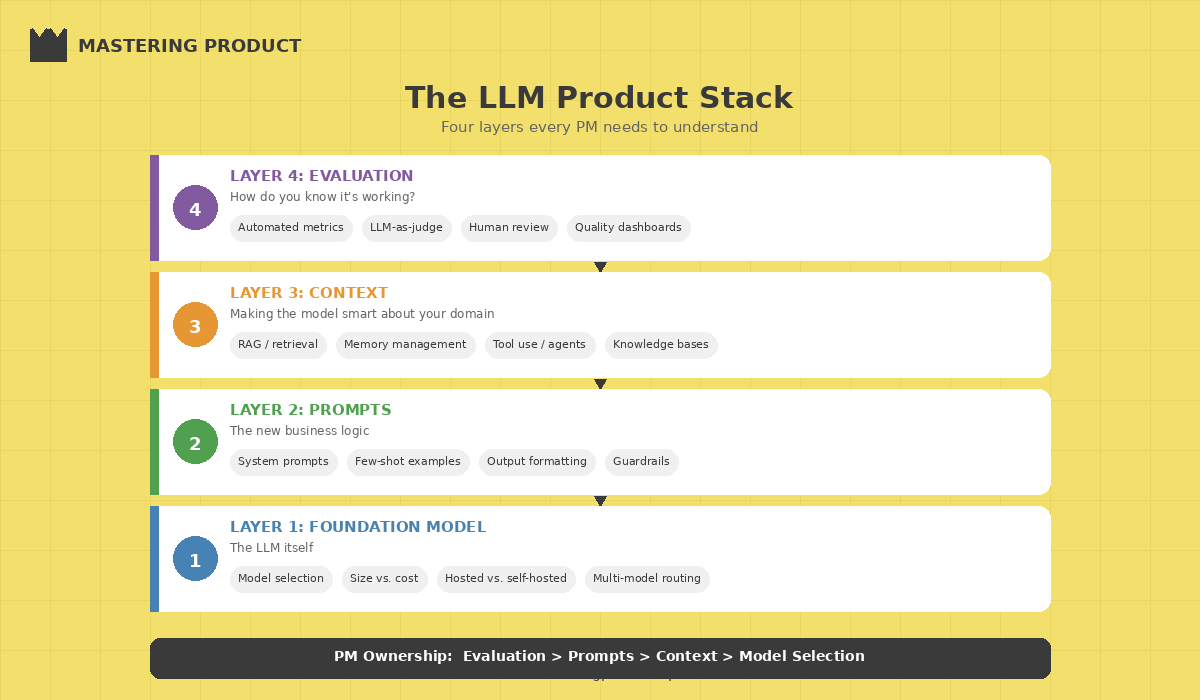
You don’t need to train models, but you do need to understand the stack you’re building on. Here are the layers that matter for product decisions:
Layer 1: The Foundation Model
This is the LLM itself, GPT, Claude, Gemini, Llama, Mistral, etc. Your key product decisions at this layer:
Model selection. Different models have different strengths. Some excel at reasoning, others at creative writing, others at code generation. The right model depends on your use case, not on benchmarks. Always prototype with 2-3 models before committing.
Model size vs. cost tradeoff. Larger models are generally more capable but slower and more expensive per call. For many product features, a smaller, faster model delivers 90% of the quality at 20% of the cost. Map your quality requirements to the smallest model that meets them.
Hosted vs. self-hosted. API-based models (OpenAI, Anthropic, Google) are the fastest path to production. Self-hosted open-source models (Llama, Mistral) give you more control over cost, latency, and data privacy, but require ML infrastructure expertise. For most teams, start with APIs.
Layer 2: The Prompt Layer
This is where product requirements meet the model. Prompts are the new “business logic” for LLM features, and they deserve the same rigor you’d give to any core product component.
System prompts define the model’s persona, constraints, and behavioral guardrails. Think of them as the product spec the model follows on every interaction.
User prompts are what your users actually send. Your product design determines how structured or freeform these are, and that decision has massive implications for output quality.
Few-shot examples are sample input-output pairs you include in the prompt to guide the model’s behavior. They’re one of the most effective and underused techniques for improving output quality.
Layer 3: The Context Layer
LLMs are only as good as the context you give them. This layer is where most product differentiation happens.
Retrieval-Augmented Generation (RAG) pulls relevant information from your data sources and includes it in the prompt context. This is how you make a generic LLM knowledgeable about your specific domain, your product docs, customer data, internal knowledge bases.
Memory and conversation history determine how much prior context the model has access to. Managing this well is a core UX challenge too little context and the model forgets what was discussed; too much and you hit token limits and increase cost.
Tool use and function calling let the model take actions, querying databases, calling APIs, updating records. This is what turns a chatbot into an agent. It’s powerful but introduces new failure modes that require careful product guardrails.
Layer 4: The Evaluation Layer
This is the layer most teams build last but should build first. How do you know if your LLM feature is working well? Traditional software testing doesn’t apply. You need new approaches, and we’ll cover them in detail below.
Prompt Engineering: The PM’s Role
Prompt engineering has become its own discipline, but as a PM you don’t need to become a full-time prompt engineer. You do need to understand the principles well enough to set quality standards, review prompt designs, and have informed conversations with your engineering team.
The Prompt Design Principles That Matter Most
1. Be explicit, not implicit. LLMs follow instructions literally. If you want the model to respond in bullet points, say “respond in bullet points.” If you want it to stay under 200 words, say “keep your response under 200 words.” Vague instructions produce vague outputs.
2. Define the boundaries, not just the task. Tell the model what NOT to do as clearly as what TO do.
”Answer the user’s question about our product. If you don’t know the answer, say ‘I don’t have that information’ rather than guessing. Never discuss competitor products. Never make promises about future features.”
3. Use structured output formats. When you need consistent, parseable outputs (for downstream processing or UI rendering), specify the exact format: JSON schemas, markdown templates, or explicit field definitions. This dramatically reduces unpredictable outputs.
4. Iterate with real user inputs. Prompts that work perfctly with your carefully crafted test cases will break with real user inputs. Collect actual user queries early, even from beta users or internal testers, and optimize your prompts against those.
The Prompt Development Workflow
Here’s the workflow I recommend for product teams developing LLM features:
| Step | Who Leads | What Happens |
| 1. Define intent | PM | Describe what the feature should do, its constraints, and success criteria in plain language |
| 2. Draft prompt | PM + Engineer | Translate intent into an initial system prompt with examples |
| 3. Test with edge cases | Engineer + QA | Run the prompt against adversarial, ambiguous, and boundary inputs |
| 4. Evaluate outputs | PM + Domain expert | Score outputs on accuracy, relevance, tone, and safety |
| 5. Refine and version | Engineer | Iterate on the prompt based on evaluation results; version control every change |
| 6. Monitor in production | Engineer + PM | Track output quality metrics, user feedback, and failure patterns |
Key insight: Treat prompts like product copy, they need regular review, A/B testing, and iteration. A prompt that works well in March may degrade by June as user behavior evolves or the model provider ships updates. Build prompt maintenance into your sprint cadence.
Evaluation: The Make-or-Break Skill
If there’s one section of this article to internalize, it’s this one. Evaluation—knowing whether your LLM feature is actually good—is the single biggest gap in most AI product teams. Without a robust evaluation framework, you’re shipping blind.
Why Traditional Testing Falls Short
In traditional software, a test either passes or fails. The login button works or it doesn’t. But LLM outputs exist on a spectrum of quality. A response can be partially correct, technically accurate but unhelpfully verbose, factually right but tonally wrong, or perfectly helpful for one user segment but confusing for another.
You need a quality framework that captures these nuances.
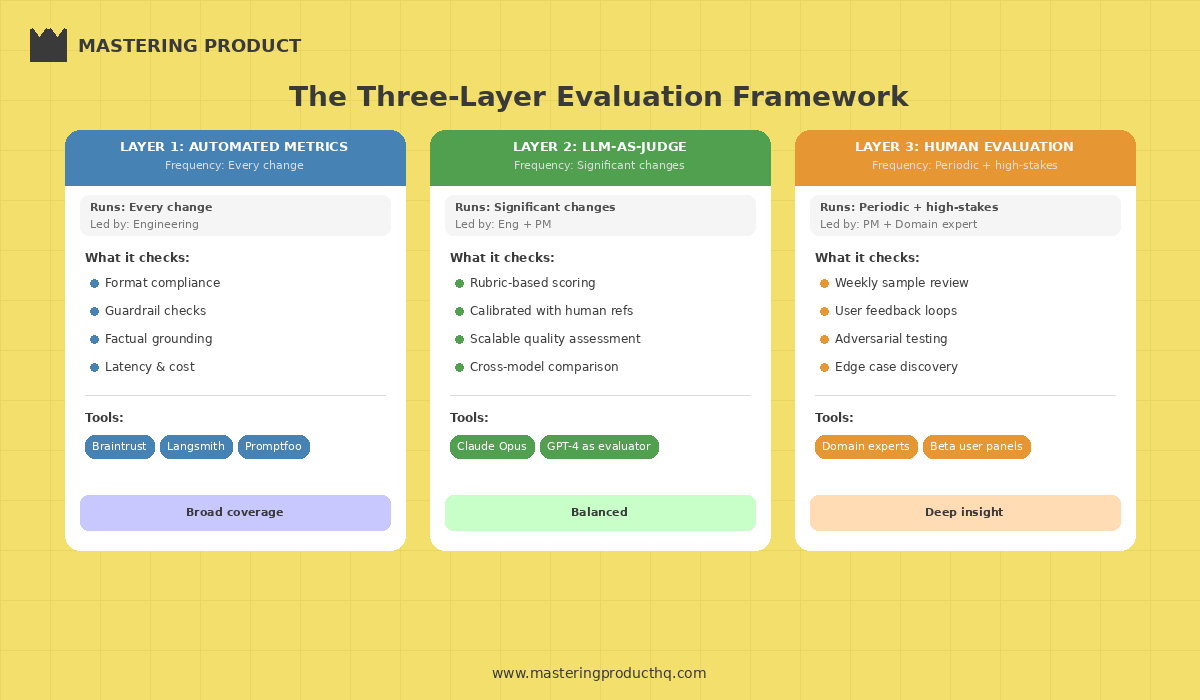
The Three-Layer Evaluation Framework
**Layer 1: Automated Metrics (Run on every change)**
These are programmatic checks that run automatically on a test set of inputs:
Format compliance: Does the output match the expected structure (JSON, bullet points, length limits)?
Guardrail adherence: Does the output stay within defined boundaries (no competitor mentions, no hallucinated URLs, no PII leakge)?
Factual grounding: For RAG-based features, does the output cite information actually present in the retrieved context?
Latency and cost: Does the response meet performance SLAs?
Tools like Braintrust, Langsmith, and Promptfoo make automated evaluation pipelines practical to set up—and they’re worth the investment early.
Layer 2: LLM-as-Judge (Run on significant changes)
Use a separate LLM to evaluate the quality of your feature’s outputs. This sounds circular, but it’s surprisingly effective when done right:
Define rubrics with clear scoring criteria (1-5 scale for accuracy, helpfulness, tone)
Use a more capable model (e.g., Claude Opus or GPT) to judge outputs from a smaller model
Include human-scored reference examples so the judge model is calibrated
This gives you scalable quality assessment without requiring human review of every output.
Layer 3: Human Evaluation (Run periodically and for high-stakes features)
Nothing replaces human judgment for catching subtle quality issues:
Weekly sample review: PM and domain expert review a random sample of 20-50 production outputs
User feedback loops: Thumbs up/down, explicit ratings, or follow-up surveys
Adversarial testing: Dedicated sessions where the team tries to break the feature with edge cases
The Evaluation Cadence
| Frequency | Evaluation Type | Who’s Responsible |
| Every prompt change | Automated metrics against test set | Engineering |
| Weekly | LLM-as-judge on production sample | Engineering + PM |
| Bi-weekly | Human review of flagged outputs | PM + Domain expert |
| Monthly | Comprehensive eval + adversarial testing | Full product trio |
| Quarterly | Benchmark against newer models | Engineering + PM |
UX Patterns That Actually Work
LLM features introduce UX challenges that traditional product design doesn’t prepare you for. Here are the patterns that consistently work wel, and the anti-patterns to avoid.
Pattern 1: Set Expectations Transparently
Users need to understand they’re interacting with AI, what it can and can’t do, and when to trust (or verify) its outputs.
Label AI-generated content clearly. Don’t try to pass off AI outputs as human-written.
Show confidence indicators when the model is uncertain. Even a simple “I’m not fully confident in this answer” goes a long way.
Provide source citations for factual claims, especially in RAG-based features. Let users verify.
Pattern 2: Constrain Input to Improve Output
Freeform text boxes are the enemy of consistent LLM quality. The more you guide user input, the better the outputs:
Predefined action buttons (”Summarize this,” “Draft a reply,” “Find similar”) outperform open-ended “ask me anything” interfaces for task-specific features
Structured forms with AI assist (fill in the blanks, then AI generates) produce more reliable results than pure generation
Progressive disclosure that starts with a focused task and allows “go deeper” follow-ups
Pattern 3: Make Editing a First-Class Feature
AI-generated content should be a starting point, not a finished product. Design for human-in-the-loop editing:
Inline editing of AI outputs (not just regenerate/accept)
Multiple variations so users can pick and combine elements
Edit history so users can undo AI suggestions without losing their work
Pattern 4: Design for Failure Gracefully
LLM features will produce bad outputs. Design for this inevitability:
Easy reporting of bad outputs (thumbs down, flag button) that feeds back into your evaluation pipeline
Graceful fallbacks when the model can’t help (”I’m not able to help with that, but here’s where you can find the answer”)
Rate limiting and guardrails to prevent misuse and runaway costs
Anti-Pattern: The “Magic AI” Trap
The biggest UX mistake is promising too much. Products that present AI as omniscient (”Ask me anything!”) train users to expect perfection and then disappoint them. Products that position AI as a helpful assistant (”I can help you draft, summarize, and organize—here’s what I’m best at”) set appropriate expectations and delight users when the AI exceeds them.
Cost Management: The Hidden Product Decision
LLM API costs are a direct function of product decisions. As a PM, you influence the bill more than you might think.
Token-conscious design decisions:
| Design Choice | Cost Impact | Better Alternative |
| Long, detailed system prompts | Higher per-call cost | Keep prompts concise; move static context to cached prefixes |
| Unlimited conversation history | Grows with every turn | Summarize older turns; use sliding context windows |
| Always using the largest model | Highest per-token cost | Route simple queries to smaller models; use large models for complex tasks |
| Generating long responses by default | More output tokens | Set response length limits; let users request “more detail” |
| No caching of repeated queries | Redundant API calls | Implement semantic caching for common queries |
The model routing pattern: For many products, the smartest cost optimization is routing different types of requests to different models. Simple classification tasks go to a fast, cheap model. Complex reasoning goes to a more capable (expensive) model. A lightweight router model or rule-based classifier handles the routing decision. This can cut costs by 50-70% with minimal quality impact.
Shipping Your First LLM Feature: A Practical Playbook
If you’re shipping your first LLM-powered feature, here’s the sequence that minimizes risk:
Week 1-2: Discovery (use the Discovery Sprint from Part 1)
Validate that the problem actually benefits from LLM capabilities
Test whether users want AI-generated outputs or just better traditional UX
Prototype with off-the-shelf tools before writing any code
Week 3-4: Prompt Development & Evaluation Setup
Draft system prompts based on your product requirements
Build a test set of 50-100 representative inputs (include edge cases)
Set up automated evaluation metrics
Benchmark 2-3 models against your test set
Week 5-6: Build the Feature
Implement the feature with proper abstraction layers (don’t hardcode a single model provider)
Add guardrails: input validation, output filtering, rate limiting
Build the feedback mechanism (thumbs up/down at minimum)
Week 7-8: Internal Testing & Iteration
Dogfood aggressively, get the whole team using it daily
Run adversarial testing sessions
Iterate on prompts based on real usage patterns
Set up cost monitoring dashboards
Week 9-10: Controlled Rollout
Ship to a small percentage of users (10-20%)
Monitor quality metrics, cost per user, and user feedback daily
Iterate on prompts and guardrails based on production data
Expand gradually as metrics stabilize
Ongoing: Monitor, Evaluate, Improve
Weekly output quality reviews
Monthly model evaluations (newer models may perform better or cheaper)
Quarterly prompt overhauls based on accumulated learnings
The PM Skills You Need to Develop
Building LLM products requires expanding your PM toolkit. Here’s what to invest in:
Learn to write prompts. You don’t need to be an expert, but you should be able to draft a working system prompt, understand why it produces certain outputs, and iterate on it. Spend a few hours experimenting with different prompting techniques, it’s the fastest way to develop intuition.
Understand tokenization and context windows. Know that models have finite input capacity, that longer inputs cost more, and that how you structure context affects output quality. This knowledge directly informs product decisions.
Get comfortable with probabilistic quality. Your LLM feature will never be 100% accurate. Your job is to define what quality threshold is acceptable, design the UX to handle failures gracefully, and build evaluation systems that catch degradation early.
Learn to read evaluation reports. You don’t need to build the evaluation pipeline, but you need to interpret the results, understand what accuracy, precision, recall, and quality scores mean for your users’ experience.
Stay current on model releases. The LLM landscape changes monthly. A model that didn’t exist when you started building may outperform your current choice by the time you ship. Build your product to be model-agnostic and review alternatives quarterly.
The New Product Management Discipline
Building products on top of LLMs is a genuinely new discipline within product management. The core PM skills, understanding users, defining problems, prioritizing ruthlessly, shipping iteratively, all still apply. But the tools, workflows, and quality frameworks need to evolve.
The PMs who will thrive in this era are the ones who develop fluency with prompts, build evaluation into their process from day one, design for AI’s inherent unpredictability, and stay relentlessly focused on user outcomes rather than getting dazzled by the technology.
LLMs are the most powerful building blocks we’ve ever had access to as product builders. But a building block without a blueprint is just a pile of potential. Your job as a PM is to provide the blueprin, to channel this capability into products that solve real problems, work reliably, and earn users’ trust.
That’s the craft. And it’s never been more exciting to practice it.
Are you building LLM-powered features? What’s been your biggest challenge, evaluation, prompts, UX, or cost? Reply to this email to share your experience, I read every response and would be happy feature reader insights in future newsletters.
This was Part 2 of our AI Product Strategy series. Missed Part 1? Read “AI-First Product Strategy: When to Build, Buy, or Partner” for the strategic framework that precedes the tactical guide above.